Android Earthquake Alerts: How to Enable Them
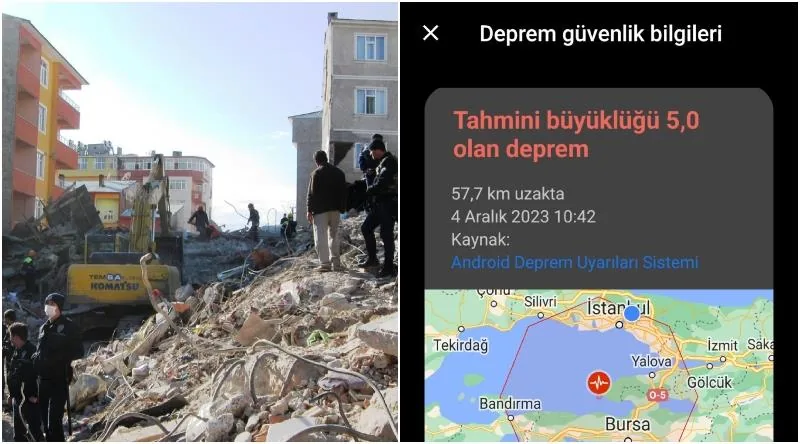
Your phone can warn you that the ground is about to move, a few seconds before you feel a thing. That is not a gadget from the future. It is a feature sitting quietly inside most modern Android phones, and many people only discover it on the day it buzzes. In December 2023, an earthquake in Turkey gave the system a very public moment, and a lot of people learned in those seconds whether their phone would speak up. If yours stayed silent, or the alert was so faint you barely caught it, the fix is usually a few taps away.
Android phones can deliver earthquake early warnings through Google's built-in alert system, which is switched on by default in many regions, including Turkey. The alert arrives seconds before shaking and tells you to drop, cover, and hold on. If you heard nothing during the December 2023 Bursa earthquake, your settings or your phone's alert volume may need adjusting.
- According to an unverified account, a magnitude 5.0 earthquake struck near Bursa, Turkey, in December 2023, and shaking was reportedly felt in Istanbul.
- Android's earthquake early warning system uses phone sensors and Google Play Services to detect quakes and push alerts to nearby devices.
- The feature is available in Turkey and a growing list of countries, and it can be enabled or disabled in your phone's safety settings.
- Alert volume is controlled separately from your ringtone and notification volume on many Android phones.
- Google does not offer a public test button for the system, so users typically confirm their settings rather than trigger a practice alert.
A Phone That Warned Before the Ground Shook
On December 4, 2023, people in Turkey say their phones lit up with a message they had not asked for: a warning that the ground was about to move. The account that circulated afterward describes a magnitude 5.0 earthquake near Bursa, reportedly strong enough to be felt in Istanbul, and an Android earthquake early warning system that delivered its message a few seconds before the shaking started. Treat that episode as a reported story rather than a confirmed record. Even so, the technology behind it is real, and it is sitting inside hundreds of millions of phones right now.
What surprised people most was the absence of an app. Nobody had installed anything. There is no "earthquake notification" program to download, no icon to tap. The alert came from the Android operating system itself, which means the feature can arrive on a phone that its owner never configured for disasters at all.
Google has built an Android Earthquake Alerts System that turns ordinary phones into a detection network. Each device carries an accelerometer, the same tiny sensor that knows when you rotate the screen. Across a region, thousands of those sensors can register the first tremors of a quake, and the system uses that collective signal to push a warning to phones further away, where the shaking has not arrived yet. A few seconds of notice is not much. It is enough to step away from a window, drop to the floor, or get out of a stairwell.
The feature lives in your location settings. On many Android devices you can switch it on by opening Settings, going into Location, and looking for the earthquake alerts option on that page. Location services generally need to stay enabled for the system to work, which is the trade-off: a phone that does not know roughly where it is cannot tell you that danger is approaching.
Not every alert lands the way it should. One user with a Samsung phone, in an account that cannot be verified, reported that the notification arrived silently despite the phone's volume being up, and said they were not running any earthquake-related program at the time. That single report is not a confirmed widespread fault. The same user passed along a claim from another forum member that transferring data from an older Samsung phone through Smart Switch might interfere with these alerts, and that a special notification tone for earthquake warnings could be picked inside Google Play Services notification settings. Neither of those has been verified either, so take them as tips from strangers rather than instructions. If your own warning sound seems faint, it costs nothing to dig through your notification settings and check.
How the Android Earthquake Early Warning System Actually Works
There is no "earthquake alert" app to download. Google built the Android Earthquake Alerts System directly into the operating system, and it turns your phone's accelerometer into a tiny seismic sensor. On many devices you reach it through Settings, then Location, then Location services, where an Earthquake alerts toggle sits waiting. Flip it on and the phone itself becomes part of a detection network.
That design choice explains the whole thing. Millions of Android phones already sit on nightstands, kitchen counters and office desks across earthquake country, each one carrying a motion sensor that costs Google nothing extra to use. When enough devices in the same area start registering the same kind of shaking at the same moment, the system reads that pattern as a real quake rather than a dropped phone or a slammed door. Alerts then go out to people in supported regions, often seconds before the stronger waves arrive.
Here is the trade-off. The Android Earthquake Early Warning System depends on knowing where your device is, so location services generally need to stay enabled for it to work at all. Turn location off to save battery, and you quietly step out of the network. Your phone needs to know roughly where it is, and in return you get a few extra seconds of warning when the ground starts moving.
No install, no sign-up, no separate icon on your home screen. The sensor is already in your pocket. The only thing standing between you and a warning is a setting most people never scroll past.
Users in Turkey learned this the hard way. After shaking reportedly reached Istanbul from a quake centered near Bursa on December 4, 2023, people opened their phones looking for the app that had buzzed them, and found nothing to open. The alert had come from the system itself. Some reported the notification arriving with barely any sound, which sent them digging through Google Play Services notification settings hunting for a louder tone. Whether a dedicated earthquake alert tone can be selected there is not something the available accounts confirm, and one user's theory that a Samsung Smart Switch transfer from an older phone had scrambled the alerts has no verified link behind it either.
What does hold up is the plain part. Android ships with earthquake alerts built in, they run on accelerometer data from ordinary phones, and they lean on your location staying on. Everything else is troubleshooting.
Turning It On: The Location Settings Path
There is no app to download for this. The Android earthquake early warning system is baked into the operating system itself, and you switch it on through your phone's location settings. Open Settings, tap Location, find Earthquake alerts, and turn the early warning system on. That is the whole path, and it takes less time to do than to read about.
One condition matters more than the taps: location has to stay on. Not just while you are out and about, but all day, every day. The system reads your position to decide whether a detected quake is close enough to warn you about, so the moment location services go dark, the warnings go quiet with them. The writer who walked through these steps put it plainly, saying that as far as they understood, location information needs to remain active around the clock.
The four taps, in order
- 1. Open Settings on your phone.
- 2. Tap Location.
- 3. Select Earthquake alerts.
- 4. Enable the early warning system and leave location on.
That is the practical part, and it is genuinely short. What happens after you flip the switch is where people start running into trouble, because a warning that fires silently is barely a warning at all.
When the Alert Is Too Quiet to Hear
Imagine the phone buzzing in your pocket, the screen lighting up with a warning that a quake is seconds away, and you hear nothing. That is what one user, posting under the handle "alaybeyi," described on a Turkish forum: the notification arrived silently, even with the phone's volume turned all the way up. The device was a Samsung. According to this single account, the alert simply refused to make a sound.
This is where the Android earthquake early warning system gets tricky. It works, and it works quietly well, but "working" and "audible" turn out to be two different questions. Whether this particular silent-alert case reflects a widespread flaw or just one unlucky phone cannot be confirmed, and no verified pattern has been established. What the thread does show is how quickly a community starts guessing at causes.
One forum writer floated a theory: if your previous phone was also a Samsung and you moved your data over using Smart Switch, that transfer might be tangled up with the alert trouble. It is a tidy explanation, and it is unconfirmed. There is no verified causal link between Smart Switch data transfers and malfunctioning earthquake alerts, so treat it as a hunch rather than a diagnosis.
The same account offered a possible fix. Reportedly, a special alert tone for earthquake warnings can be selected inside the Google Play Services notification settings. The user said their own alert was barely audible, changed the tone there, and waited to see if it helped. Whether such a user-selectable tone officially exists is not something that can be confidently confirmed, so this one stays firmly in the "maybe" pile.
What is not in doubt is the part underneath all of this. The Android system itself, not a separate app, carries the earthquake alert service, and you switch it on through your location settings. The alerts lean on your device's location, which means location services generally need to stay on for the system to function at all. So if the warnings seem to have gone missing, the settings menu is a reasonable place to look first, and the sound of the alert is worth a second glance.
Frequently asked questions
What is the Android earthquake early warning system?
The Android earthquake early warning system is software built directly into the Android operating system, not a separate app you download. It taps the accelerometers inside ordinary phones, which sense the first shaking of a quake, and then uses that crowd-sourced data to send alerts to other Android users in the affected area, often seconds before the stronger waves arrive.
How do I enable earthquake alerts on my Android phone?
Open your phone's Settings, go to Location, and look for the Earthquake alerts option on that page. Tap it and switch the system on. Because the feature depends on knowing where your device is, location services need to stay enabled all day for it to work, so it can warn you the moment the ground starts to move.
Was the Bursa earthquake felt in Istanbul?
According to the account, shaking from the Bursa quake was reported in Istanbul, though that detail has not been independently confirmed for this specific event. A magnitude 5.0 quake near Bursa on December 4, 2023 is the figure the story gives, and that reading itself remains unverified. Treat the Istanbul reports as plausible but unproven.
Why didn't my earthquake alert make a sound?
One user reported that their notification arrived silently even with the phone's volume turned up. As the story goes, a Samsung owner was told that transferring data from an older Samsung phone through Smart Switch might interfere with how alerts behave, and that a special alert tone could reportedly be chosen inside Google Play Services notification settings. Neither of these has been confirmed as a known, widespread cause. Editorial note: Details that could not be independently confirmed, including exact alert delivery behavior on specific phone models, are presented as possibilities rather than established facts.
Got a take on this? Add your voice to the conversation below →
No comments yet. Be the first.