Strong Password Math: Why Length Beats Symbols
You have probably done it. You sit down to create an account, type a password you are proud of, and the little strength bar still glares back at you in red. So you bolt on a capital letter, swap an "a" for an "@", and try again. Here is the strange part. Most of that effort barely moves the needle, and the advice that taught us to do it has quietly been taken back.
A strong password resists guessing because it is long and unpredictable, not because it is complicated. Later revisions to the old guidelines dropped forced symbol and expiry rules and now favor length, checking against known-breached passwords, and adding a second layer of security such as multi-factor authentication.
- The US National Institute of Standards and Technology published password guidelines in 2003, and those rules were later revised.
- The revision moves away from mandatory complexity rules such as requiring symbols, mixed case, and numbers, because they push people toward predictable patterns.
- It also drops forced periodic expiry, since frequent changes tend to produce small, guessable variations of the same password.
- New passwords can be checked against lists of known breached and commonly used passwords, and long passphrases with spaces are allowed.
- A second layer of security, such as multi-factor authentication, means a leaked password alone is not enough to break in.
The Password We Keep Choosing, and Why It's a Problem
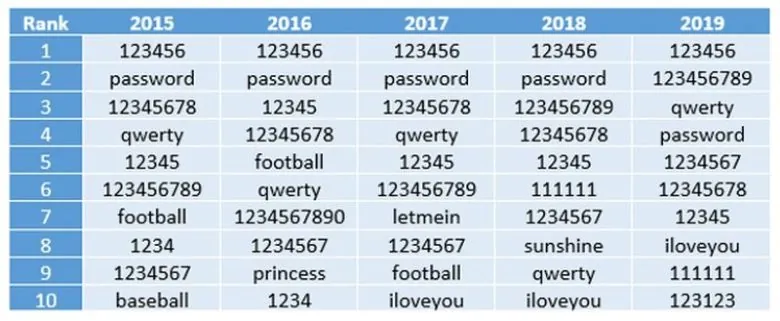
Every year, the private digital security company NordPass publishes a list of the most popular passwords across 30 countries. And every year, the same handful of entries sits at the top. The article lists the top five as "şifre" (the Turkish word for password), "123456", "123456789", "misafir" (guest) and "qwerty". That exact ordering is disputed, since NordPass rankings typically put "123456", "password", "123456789", "12345", "12345678" and "qwerty" near the top, and "guest" is not normally a top-five finisher. What is not in dispute is the bigger picture: the popularity of these weak entries barely shifted between 2015 and 2019.
We all know these are terrible choices. A strong password should be long, should mix character types, and should never be a dictionary word. We are also told to change it regularly, to use a different one for every account, and never to write it down. Then we sit at a signup form and discover that meeting all of those rules at once is nearly impossible. You finally land on something that feels genuinely strong, and the website rejects it anyway. Too short. Too long. An invalid character. For most people, the whole ritual ends in pure frustration.
Part of the blame lands on a document most of us have never read. For years, internet service providers leaned on guidelines published in 2003 by the US National Institute of Standards and Technology, which recommended passwords packed with special characters, uppercase and lowercase letters. Bill Burr, who largely authored those rules, later said he regretted most of the recommendations. The reason is quietly fascinating: forcing people to swap passwords and sprinkle in symbols tends to push them toward easy-to-remember patterns, and easy-to-remember means easy to guess. The guidelines have since been revised, but not every site has caught up, so we still get told to add numbers, capitals and symbols whether we like it or not.
The 2003 Rules That Shaped a Generation of Passwords
Bill Burr never set out to make the internet less safe. Working under the US National Institute of Standards and Technology (NIST), he helped draft a set of password guidelines published in 2003, and for years internet service providers treated those rules as gospel. Mix uppercase and lowercase letters. Add numbers. Scatter in as many special characters as you can. That was the recipe for a strong password, and millions of signup forms still enforce it today.
Then, in a 2017 interview with the Wall Street Journal, Burr admitted he regretted most of what he had recommended. The man who wrote the rules had quietly turned against his own advice.
Why? Because the logic was backwards. Force someone to swap in a symbol here and a capital letter there, and they do not invent something random. They follow a scheme. They take a familiar word, capitalize the first letter, drop a ! at the end, and call it done. The result is a password that is easy to remember, which is exactly the point, and therefore easy to guess. The rules pushed people toward predictable patterns while making them feel secure.
NIST has since revised its guidance, moving away from forced complexity and mandatory rotation. But adoption is uneven. Plenty of banks, airlines, and shopping sites never updated their validation scripts, so many of us are still stuck inventing a strong password with a capital letter, a digit, and a symbol, changing it every ninety days, and pretending that makes us safer.
The Math That Decides Everything: Length and Variety
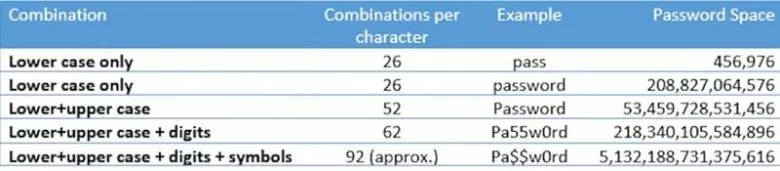
Start with something small. A six-character password built only from the 26 lowercase letters of the English alphabet gives you 26 to the sixth power, which works out to 308,915,776 possible combinations. That sounds like a lot until you picture a machine rattling through them without ever getting tired.
Now stretch the password to twelve characters and open up the alphabet. Add uppercase letters, digits, and ten symbols such as !, @, #, $, %, ^, &, /, and =. That gives 26 + 26 + 10 + 10, or 72 possible characters for every single position. Raise 72 to the twelfth power and the article puts the result at roughly 19,408,409,961,765,342,806,016 combinations. That precise figure does not quite match the true value, and treating 72 as a fixed character set is an arbitrary choice, so read it as a rough scale rather than a hard number.
The gap between those two pools is the whole story. The article frames the twelve-character space as about 62 trillion times larger than the six-character one. Run the division yourself and you get closer to 63 trillion, so the figure is in the right neighborhood rather than exact. Either way, the lesson holds: length and variety multiply against you.
Why entropy is the number that matters
Password entropy is simply a measure of how unpredictable a password is. A short string of lowercase letters sits low on that scale because there are so few ways to arrange it. Every extra character you add, and every new type of character you allow, widens the space of possibilities and pushes entropy upward. That is the real reason security advice keeps telling you to go longer and to mix cases, numbers, and symbols. It is not about making the password look scary to a human. It is about making the search space so vast that guessing becomes hopeless.
Here is the catch the article acknowledges. No matter how complex you make your password, computers are extremely efficient at repetitive tasks, and guessing passwords is one of them. The story goes that in 2021 a computer programmed to generate every conceivable password set a record by making more than 100,000,000,000 guesses per second. That specific record is hard to verify, and even the article's own framing treats it as a widely repeated claim rather than a measured constant. What is not in doubt is the direction. Cybercriminals lean on exactly this kind of raw power in what are called brute-force attacks, bombarding a system with as many combinations as they can until something gives.
The figures that follow are illustration rather than settled fact. The article claims an eight-character password can fall in as little as 12 minutes, and that criminals can pull it off for around $25. It also says that on the underground market you can buy roughly 600 million passwords for only 14 Australian dollars. Crack time and price depend heavily on how the password was stored and how fast the hashing is, so treat all three as claims rather than measured constants.
What is not in dispute is how badly we choose. Just by entering 1234, you would break more than 10% of all PINs worldwide, a finding that comes from analyses of leaked PIN data. The article goes further and says 1234, 0000, and 1111 together account for about 20% of all passwords, though that figure more properly describes four-digit PINs than passwords in general. Either way, the pattern is uncomfortable: given four slots and a keypad, we reach for the same handful of digits again and again. That predictability, not the length of the string, is what makes a strong password so hard to achieve by instinct alone.
How Fast Can a Machine Guess? The Brute-Force Reality
Somewhere in 2021, a machine reportedly did nothing but guess. According to the account that circulated at the time, it was programmed to generate every password it could imagine, and it set a record by producing more than 100,000,000,000 guesses in a single second. That number deserves a pause. One hundred billion attempts, every tick of the clock.
Treat that figure carefully, though. Cracking rigs built around weak hashing algorithms have pushed into the hundreds of billions of guesses per second, so the general shape of the claim is not fantasy. The specific 2021 record is harder to pin down. What matters more is the principle: computers are relentless at repetitive work, and guessing is repetitive work.
This is the engine behind what security people call a brute-force attack. There is no cleverness in it, no trick, no insider knowledge. A criminal simply floods a system with combination after combination until something opens. The machine does not get bored, does not get tired, and does not need a coffee break.
Twelve Minutes and Twenty-Five Dollars
Now the uncomfortable part. The same account claims an eight-character password can fall in roughly twelve minutes, and that the whole exercise costs about $25. Both figures are reported rather than settled. Crack time swings wildly depending on the character set and the hashing method used, and the $25 price tag is not something anyone can reliably confirm. What is not in doubt is the direction of travel: short passwords are cheap to break.
Then there is the secondhand market. The article says you can buy something like 600 million passwords for about 14 Australian dollars. Bulk dumps of stolen credentials have indeed been sold for pocket change, though the exact quantity and price here cannot be verified. Either way, the economics are bleak. Why spend hours guessing when someone has already done the guessing for you?
The Four Digits You Trust Every Day
So even a long, complex password may not fully shield you, and yet we hand our money over on the strength of four digits. A bank card PIN is a four-number code. Four positions, ten possibilities each, and a species that keeps choosing 1234.
That is the gap this whole story lives in. We build stronger locks, we lecture ourselves about strong password habits, and then we walk up to an ATM and type the same sequence millions of other people typed before us.
1234: How We Give Away 10% of the World's PINs
Here is a number worth sitting with for a second: 1234. Just by typing those four digits, you can break more than 10% of all PINs worldwide. That is not a guess or a scary headline. It comes from a large-scale analysis of leaked PIN data by DataGenetics, which found that "1234" alone accounts for roughly 10 to 11% of every four-digit PIN in use.
Think about what that means in practice. A thief does not need a device, a trick, or a victim who wrote anything down. They need three seconds and a thumb. One in ten bank cards, phone locks, and door codes opens to the same lazy pattern, and the person holding it probably felt clever when they set it.
Now look at the bigger picture. The article says 1234, 0000, and 1111 together make up about 20% of four-digit PINs. So roughly one in five PINs falls into a tiny handful of combinations that any attacker would try first. If you ever wondered why a stolen card gets drained so fast, this is a large part of the answer.
The most striking evidence comes from a visualization that ranks every possible four-digit combination by how often people actually choose it. Plot the first two digits on one axis and the last two on the other, and a bright 45-degree diagonal jumps out of the graph. Along that line sit 1111, 2222, 3333, and their siblings, each one lit up as far more common than the thousands of forgettable codes around them. We are not random creatures, even when randomness would protect us.
That is the uncomfortable lesson. Even when our own security is on the line, we are still not good enough at choosing a strong password or a strong PIN. We reach for patterns, birthdays, and repeats because they are easy to remember, and easy to remember is easy to guess. It is exactly why websites and banks keep nagging us to update our credentials or build something harder. They are not being difficult for fun. They have seen the graph.
The next time a login box refuses your first attempt and demands something stronger, remember that diagonal. Somewhere, a machine is already trying 1234 on your behalf.
How Websites Check Your Password Without Ever Seeing It
Open a sign-up form and start typing a new password. Notice that the page never reloads, not once, until you finally click the registration button. Yet the little bar beside the field fills up, turns from red to green, and scolds you when you forget a capital letter. So how does the site judge your password without ever sending it to the server?
The answer sits in your browser, not on a distant machine. A small piece of code written in JavaScript does the whole job locally. JavaScript is an object-oriented programming language that, together with HTML and CSS, forms the core technology the World Wide Web is built on. That means the check happens on your own device, in real time, with nothing transmitted back and forth.
What the script is actually doing
Think of it as a clipboard-wielding inspector standing over your shoulder. The script watches the password field keystroke by keystroke, running whatever you type through a checklist of required characters. Need a digit? A symbol? An uppercase letter? Each box gets ticked or left empty, and if something is missing, an error message appears right there. No network request, no waiting, no round trip to a server that might be slow or down.
The hashing running quietly in the background
Alongside that checklist, a second process hums away: a hashing algorithm, which scrambles your input into a fixed string of characters. The article offers an example, the password "Pa$w0rd" run through the SHA1 hashing algorithm, and gives the resulting digest. Treat that digest as an illustration rather than a figure you can bank on, since the exact SHA1 output cannot be reliably confirmed here.
Here is the unsettling part the article highlights. Paste a hash like that into a search engine and the original password can surface with almost no effort at all. The scramble is only as protective as the algorithm behind it, and old, fast algorithms leave a trail anyone can follow. Which is exactly why a genuinely strong password needs more than a clever substitution trick.
The Way Out: Passkeys, Biometrics, and Password Managers
In May 2023, Google took the first real step toward killing the password: it began letting people sign in to their Google accounts with a passkey, unlocking the account with a fingerprint, a face scan, or a device PIN instead of a typed secret. That single change, announced on Google's own security blog, turned a long-running thought experiment into something you could actually switch on.
There is a second route that skips the passkey entirely. You get a one-time code pushed to a device you already trust, say a text message to your phone, and you type that code into the website. No memorized string travels between you and the server, so there is nothing for a thief to steal off a list.
Until the day we no longer have to remember passwords, if that day ever arrives, password managers probably give you the most protection for the least effort. Here is the honest catch: you still have to create one password, the master key that opens the vault. But remembering only that one lets you hand everything else off to the manager, which can generate long, random, unique strings for every account you own and fill them in for you.
The article ends on a practical note, and it is worth taking literally. The internet is full of traps, but simple precautions will relatively protect you. The best thing you can do right now is check your passwords and strengthen the ones you think are weak. That is a strong password habit in one sentence: look at what you have, and fix the soft spots first.
Frequently asked questions
What makes a password strong according to math?
A strong password is strong because of the size of its search space. Length and character variety multiply the number of possible combinations, so a six-character lowercase password offers 26^6, or 308,915,776 options, while a twelve-character mix of upper and lowercase letters, digits and symbols pushes the count far higher. Entropy measures how unpredictable that space really is.
Why did NIST change its password guidelines?
The US National Institute of Standards and Technology published guidelines in 2003 that pushed passwords packed with special characters, uppercase and lowercase letters. Those rules forced people into predictable patterns. Bill Burr, who helped create them, said in a 2017 Wall Street Journal interview that he regretted most of the recommendations, and the guidelines were later revised.
How fast can a computer guess passwords?
As the story goes, a computer programmed in 2021 to generate every possible password reportedly set a record by making more than 100,000,000,000 guesses per second. The same account claims an 8-character password can fall in just 12 minutes for about $25. Treat those figures as reported rather than fixed, since crack time depends on the character set and hashing method.
How do websites check password strength without sending it to the server?
When you type a new password, the page checks its strength locally, without talking to the server. A small script written in JavaScript, the object-oriented language that forms one of the core technologies of the World Wide Web alongside HTML and CSS, watches the password field and runs your input through a checklist. A hashing algorithm such as SHA1 processes the input in the background.
Was Bill Burr's 2003 password advice wrong?
Burr himself said he regretted most of it. The complexity rules backfired because forcing people to change passwords and add special characters nudged them toward easy-to-remember schemes and patterns, which are exactly what makes a password weak. The guidelines were revised, though not every provider has kept up.
What is password entropy?
Password entropy is a measure of how unpredictable a password is. As length grows and more character types are added to the pool, the password space widens, which is why long passwords mixing upper and lowercase letters, digits and symbols are recommended over short, simple ones.
Did Google start allowing biometric logins without passwords?
Yes. In May 2023, Google announced passkey support for Google Accounts, letting users sign in with biometric data or a PIN instead of typing a password. Another option is receiving a code on an authenticated device, such as by SMS to a phone, and entering it on the website. Editorial note: Details that remain unconfirmed, including any specific time-to-crack figures, are presented as estimates rather than settled facts.
Got a take on this? Add your voice to the conversation below →
No comments yet. Be the first.