SSD Upgrade: Revive a Slow Computer Before Buying New
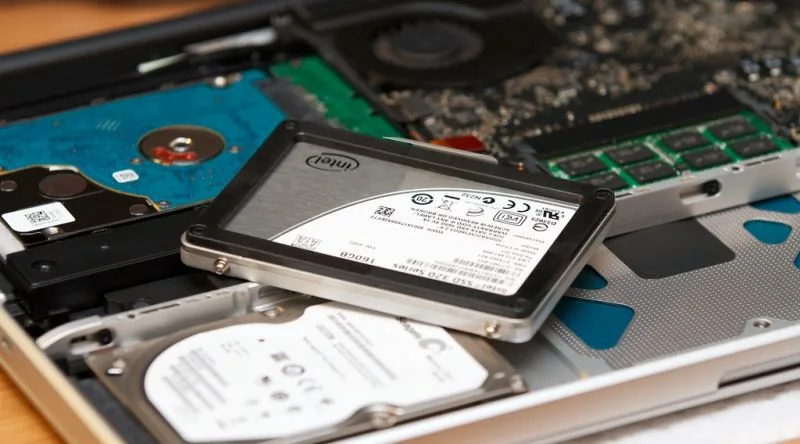
A simple SSD upgrade for a slow computer can restore its speed in a single afternoon, often making an older PC feel brand new without the cost of a replacement. If you've been frustrated by endless loading screens and the spinning wheel of death, this is the fix that finally brings your machine back to life.
Upgrading an aging computer's hard drive to a solid-state drive dramatically reduces boot times and application loading, improving overall responsiveness. This is one of the most effective hardware changes for reviving a slow PC, and it often costs far less than buying a new machine.
- A standard hard disk drive (HDD) uses spinning platters and a moving read/write head, which creates a physical bottleneck that slows down file access.
- Solid-state drives (SSDs) use flash memory with no moving parts, allowing them to read and write data much faster than traditional drives.
- The most noticeable improvement after an SSD swap is boot time, which can drop dramatically on most systems.
- The upgrade process is straightforward for desktop computers and many laptops, requiring minimal tools and time.
- A new SSD often costs a fraction of what you would pay for a new computer, making it a cost-effective performance upgrade.
Your PC feels ancient, but the real culprit might be hiding inside
That sluggish, groaning machine on your desk might not need replacing at all. The real fix could be a single component swap that costs a fraction of a new computer. If your PC takes minutes to open a browser, an SSD upgrade for slow computer is very likely the answer you've been looking for.
This is the conversation I keep having with friends who swear their old computer is beyond saving. They describe the same frustrating ritual: press the power button, go make coffee, come back, and Windows is still crawling to life. They blame the processor, the RAM, the graphics card. But the actual bottleneck, more often than not, is a hard drive that has been spinning for years.
Here's the thing about those old drives. A traditional HDD works like an old record player, with physically rotating disks and moving read/write heads that have to hunt across the surface for your data. Every click and whir you hear is mechanical work happening at a snail's pace. An SSD, or Solid State Drive, stores data in flash memory cells instead, with no moving parts at all. Everything happens electronically, which is why the time it takes to reach your information shrinks so dramatically.
Now, a word of honesty before you get too excited. An SSD is not a magic wand. It won't dramatically strengthen a machine with a very old, weak processor and low RAM, since it can't take over the work those components are supposed to do. And while some argue it's more logical to install a quality SSD on your current setup than to drop money on a brand new system, that's a judgment call that depends on how old your other parts really are. But for the vast majority of people whose only crime was buying a computer before solid-state storage became standard, the fix is often exactly what they need. Don't throw the whole machine away. Just give it a new heart.
Why an SSD upgrade for slow computer beats a new PC (and why HDDs are the real slowdown)
An SSD upgrade for slow computer systems is usually one of the most effective fixes you can make, and it can beat buying a whole new machine in many cases. The culprit behind that sluggish feeling is often not the processor, RAM, or graphics card you've been blaming. More often than not, it's the aging mechanical hard drive spinning away inside your case, and swapping it out changes everything.
Let's get the basics straight. An SSD, which stands for Solid State Drive, stores your data in flash memory cells. There are no spinning platters, no moving arms, no mechanical anything. An HDD, on the other hand, works like a tiny gramophone inside your computer. It has physically rotating disks and a read/write head that physically moves across the surface to find your files. That mechanical dance takes time, and after years of use, it gets slower and slower.
Here's where the magic happens. Because an SSD has zero moving parts and operates entirely through electronic signals, the time it takes to access information drops dramatically. You press the power button, and before you can even process that the screen is on, you're staring at your desktop. With an old HDD, you could brew a cup of coffee, wander back, and Windows would still be loading.
This is why an SSD upgrade for slow computer systems can deliver a bigger daily impact than upgrading your processor or boosting your RAM. Think about everything that suddenly becomes snappy: Windows booting up, programs launching, browsers opening, files copying, game loading screens, and the overall responsiveness of the system. Every single one of those operations improves noticeably.
Now, a word of caution. An SSD is not a magic wand. It reportedly won't dramatically strengthen a very old computer with a weak processor and low RAM. Its job is on the storage side. It cuts down waiting times and makes the system feel fluid, but it won't take over the heavy lifting your CPU or graphics card is supposed to do. Still, for the vast majority of users who just want their daily tasks to feel smooth, the fix is clear. Some suggest it's more logical to install a quality SSD on your existing computer than to spend a thousand dollars on a brand new system, though that cost-benefit call depends on how old your other components really are.
What actually gets faster when you swap in an SSD
Press the power button on an old hard-drive computer, walk to the kitchen, brew a coffee, and come back: Windows is still loading. Install an SSD in that same machine and you will often reach the desktop before the boot screen even finishes appearing. That single swap transforms nearly every waiting moment you have with your computer.
Windows startup and shutdown speed up dramatically. Programs launch faster, browsers pop open without that agonizing pause, file copying finishes in a fraction of the time, and game loading screens shrink from minutes to seconds. The whole system simply feels more responsive, like the machine is actually listening to you instead of grinding through every request.
The effect hits hardest on older-generation computers. Upgrading the processor or adding RAM helps, sure, but an SSD upgrade for slow computer problems can deliver a more noticeable daily difference than either of those. The reason comes down to the hardware itself. A traditional HDD spins physical disks and moves read/write heads across the surface, like a tiny gramophone working through every track. An SSD stores data in flash memory cells with zero moving parts, everything happening electronically, so reaching information takes a fraction of the time.
People who were ready to throw their PCs away have reported feeling rejuvenated after the install. Many users who had given up entirely found their old machine felt brand new. As the story goes, many people assume their sluggish computer needs a new processor or graphics card, when the real bottleneck was the aging mechanical drive all along.
That said, the SSD is not a magic wand. A very old machine with a weak processor and low RAM will not gain much strength from the swap. The drive handles storage, cutting wait times and smoothing out the system, but it does not take over the work a CPU or graphics card must do. For most everyday users with decent processors, though, the upgrade delivers exactly the speed they were missing.
Who should (and shouldn't) expect miracles from an SSD
An SSD upgrade for slow computer owners is one of the most transformative fixes for anyone still running on a mechanical hard drive, especially if you use your machine for everyday tasks, occasional older games, and general browsing. If that sounds like you, you're exactly who benefits most. People who already own an SSD, or those with seriously dated processors and very little RAM, should temper their expectations.
The sweet spot is the person whose computer isn't fundamentally broken, just sluggish. You know the type: the machine that takes five minutes to open a simple program, that groans when you open a browser, that makes you sigh every time you press the power button. For that user, a solid state drive is nothing short of a resurrection. When someone complains their PC has become unusable, the first advice is often to install an SSD before even talking about anything else. That's because most people blame the processor, the RAM, or the graphics card for their slowdowns, when the real culprit is usually the aging mechanical HDD that's been spinning for years.
Here's the thing about how these two storage types work. A hard disk drive has physically rotating platters and moving read/write heads, essentially operating on a gramophone-like principle. An SSD, by contrast, has zero moving parts; everything happens electronically through flash memory cells. That's why an SSD upgrade for slow computer owners can deliver such dramatic results in Windows boot times, shutdown speed, program launches, browser openings, file copies, game loading screens, and overall system responsiveness. The difference is often so stark that people who reluctantly install one come back saying they were about to throw the computer away and now feel like they've gotten a new machine.
But here's the honest caveat. An SSD is not a magic wand. If your processor is very old and weak and your RAM is low, the drive won't dramatically strengthen the system. The SSD handles storage and cuts down wait times, making everything feel smoother, but it absolutely does not take over the work of the CPU or the graphics card. If you're expecting to suddenly render video at full speed, you'll be disappointed. And while some suggest that installing a quality SSD on your existing computer before spending $1,000 on a new system is the more logical move, that's a judgment call that depends heavily on how old your other components really are.
Frequently asked questions
Will upgrading to an SSD make my old laptop faster?
Yes, and the difference is often startling. Windows startup, shutdown, program launches, browser opening, file copying, game loading screens, and overall system responsiveness all see dramatic improvements. The source describes users who were ready to throw their computers away suddenly feeling like their machines had been rejuvenated after the swap.
How much faster is an SSD compared to an HDD?
The gap is enormous. An HDD works like a gramophone, with physically rotating disks and moving read/write heads that must travel across the platter to find data. An SSD has zero moving parts, operating entirely through electrical signals to flash memory cells. The access time becomes incredibly short, and the source notes you can reach the desktop before the boot screen even appears.
Should I upgrade my RAM or install an SSD first?
Install the SSD first. The source argues that an SSD can make a bigger difference in daily use than upgrading your processor or adding RAM. Most people blame their slow computer on the CPU, graphics card, or memory, but the real culprit is often the aging mechanical hard drive that has been spinning for years.
Can an SSD fix a computer with a weak processor?
No, and this is where expectations need adjusting. An SSD is not a magic wand. It will not significantly strengthen computers with very old, weak processors and low RAM. The SSD handles storage only, reducing wait times and making the system feel smoother, but it will not take over the work your processor and graphics card are supposed to do. If you are hoping to render video on a severely underpowered machine, an SSD alone will not get you there.
Got a take on this? Add your voice to the conversation below →
No comments yet. Be the first.