AI Cartoon Photo Tools: Turn Pics Into Anime Art
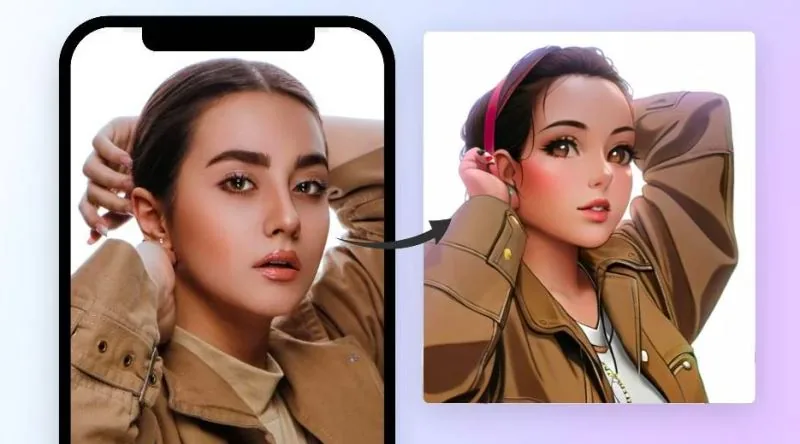
AI cartoon photo tools have completely changed how we turn everyday snapshots into playful anime and comic book art, with the best options emerging in 2025. Whether you are a casual selfie fan or a marketer hunting for eye-catching visuals, these apps now deliver studio-quality results in seconds. That moment when your face suddenly looks like a hand-drawn hero or a chibi character is genuinely delightful, and it has never been more accessible. You no longer need expensive software or artistic talent to see yourself as a cartoon.
AI cartoon photo tools are web-based and mobile apps that use machine learning to redraw your photos as anime, cartoons, or comic art. They range from free one-click filters to pro-grade style editors. In 2025, the best tools balance speed, style variety, and output quality for casual users and creators alike.
- The leading AI photo to cartoon converters in 2025 offer both free tiers and premium subscriptions for high-resolution exports.
- Top apps like Fotor, ToonMe, and others support anime, 3D cartoon, and comic book styles from a single uploaded selfie.
- Online photo cartoonizers are generally accessible through web browsers, though some tools also offer mobile apps for on-the-go editing.
- AI anime art generators like BasedLabs allow users to specify desired features and select an art style for original creations.
- Marketers use AI cartoon generators like Vidnoz for advertising, marketing, and unique product packaging designs.
The Magic of Turning Photos into Cartoons and Anime
On March 17, 2025, a roundup of ten AI cartoon photo tools made the rounds online, and it's easy to see why it caught fire. The pitch is simple: with a few clicks, your ordinary selfies and landscapes can transform into playful cartoons or sleek anime art. For anyone who grew up doodling in the margins of notebooks, that promise lands with a thud of pure delight.
The tools highlighted in that list aren't just for personal fun, though that's certainly a big part of the appeal. Several of them, like Vidnoz, are positioned as game-changers for marketing, advertising, and product packaging. Imagine a cereal box with a cartoon mascot that looks uncannily like your own smiling face, or a billboard featuring a stylized version of your brand's logo. That's the kind of creative potential these platforms are unlocking for businesses and solo creators.
What makes this moment feel different from earlier photo-editing gimmicks is the sophistication of the underlying AI. These aren't simple Instagram filters that slap a sketch overlay on your image. The better tools analyze the structure of your face, the lighting in the room, the texture of your hair, and then rebuild the whole scene in a new artistic language. The results can look hand-drawn, even when they emerged from an algorithm in seconds.
For the casual user, the appeal is more personal. There's a strange, wonderful thrill in seeing your pet's photo turned into a comic book hero, or your family portrait reimagined as an anime still. It's a way of seeing yourself and the people you love through a different lens, one that adds a layer of playfulness to everyday memories.
Top AI Tools for Cartoon and Anime Transformations
When it comes to turning your everyday photos into playful cartoon versions, the options are plentiful and surprisingly easy to use. These AI cartoon photo tools have grown into a whole ecosystem of creative apps and websites, each with its own personality and strengths. Whether you want a quick selfie makeover or something more elaborate for a project, there's a tool that fits the bill.
Cartoon-Focused Tools
Vidnoz has built a reputation for transforming ordinary photos into striking cartoonized images. It's particularly popular in marketing and advertising circles, where teams use it to craft unique product packaging designs that stand out on shelves. The platform shows off what AI can do in digital art, turning what used to be a time-consuming manual process into something quick and accessible.
Photoleap takes a playful approach with AI cartoon filters that work instantly. Users can drop a photo in and watch it transform into something from an animated adventure or even a superhero story. The app has become a favorite for people who want their pictures to tell a more whimsical tale.
Fotor focuses on portraits and landscapes, converting both into vivid cartoons with a one-click transformation feature. It's designed for people who want to add a unique, dynamic touch without investing much effort. The process is simple and fast, which is exactly what many casual users are after.
Picsart offers an AI cartoonizer with multiple filters to choose from. You can apply different AI-powered effects to your photos for instant cartoonization, swapping between styles until you find one that clicks. It's a flexible option for those who like to experiment.
VanceAI brings what its makers describe as a dynamic approach to cartoonizing, adding personality and fun to your images. It's geared toward people who want their photos to feel more creative and interesting, with a tool that handles the heavy lifting behind the scenes.
Pho.to stands out among online photo editing tools with its AI-assisted cartoonizer. It transforms ordinary portraits into fun cartoon images, whether you're doing it for personal entertainment or for a creative project. The tool adds an artistic touch that's hard to replicate with manual editing.
BeFunky makes cartoonization accessible to everyone, regardless of editing skill. You simply upload any photo and convert it into a striking cartoon. Its simplicity and effectiveness have made it a go-to for people who don't want to learn complex software just to have a little fun with their pictures.
ToonMe has gained serious popularity on app stores for its ability to create hand-drawn quality portraits from selfies. Upload a photo and the app generates a unique, personalized cartoon interpretation with a distinctive artistic style. It's become one of the most talked-about options for people who want their photos to look like they were illustrated by hand.
Anime-Focused Tools
BasedLabs takes things in a different direction, focusing specifically on anime. This platform lets you create original anime characters or scenes by specifying the features you want and selecting an art style. It's designed for artists seeking inspiration and enthusiasts who want to bring their own anime visions to life. The advanced algorithms tailor the output to your preferences, producing unique illustrations that match what you described.
One more name often comes up in these conversations: FlexClip. According to the original account, it reportedly offers one-click photo-to-cartoon conversion with effects like fantasy, retro, comic, 3D, and cyberpunk. That said, this claim hasn't been independently verified, so take it with a grain of salt if you're specifically hunting for those exact styles.
How to Choose the Right AI Cartoonizer for Your Needs
Your selfie deserves better than a basic filter. The right AI cartoon photo tools can turn an ordinary portrait into something you would actually frame, but picking one means knowing what each platform does best. Start with ToonMe if you want that hand-drawn quality, and go from there.
ToonMe has built its reputation on turning selfies into portraits that look like a skilled illustrator spent hours on them. It is an AI-powered app, available through both the Apple App Store and Google Play, and it has become one of the most popular choices for people who want that polished, artistic finish. If you upload a clear face photo, the app generates a cartoon version with distinctive linework and shading that mimics traditional drawing.
For anime fans, BasedLabs takes a different approach. Instead of just converting your photo, it lets you build original anime characters or scenes from scratch. You describe the features you want, pick an art style, and the platform generates an illustration tailored to your preferences. This makes it a strong pick for artists seeking inspiration or hobbyists who want a custom anime avatar that looks nothing like a filtered photo.
Fotor is the speed demon of the group. Its AI cartoonizer handles both portraits and landscapes with a one-click transformation feature, making it ideal when you want quick, vibrant results without fiddling with settings. Similarly, Picsart offers multiple AI-powered cartoon filters that apply instantly, giving you creative flexibility right inside a familiar editing suite.
Beginners should look at BeFunky. The tool is designed so that anyone, regardless of editing experience, can turn any photo into a cartoon in a single step. There is no learning curve, no layer confusion, just a straightforward effect that delivers. VanceAI, on the other hand, leans into adding personality and fun to your images, marketing itself as a way to inject creativity and playfulness into otherwise standard pictures.
If your project is purely for entertainment, Pho.to offers an AI-assisted cartoonizer that transforms ordinary portraits into amusing cartoon images, suitable for personal fun or creative experiments. Photoleap goes a step further with themed transformations, turning your photos into animated adventures or superhero stories through its advanced cartoon filters. FlexClip reportedly offers effects like fantasy, retro, comic, 3D, and cyberpunk with a single click, but those specific claims are unverified, so treat that one with caution until you test it yourself.
One thing to keep in mind: none of these sources provide pricing details or free tier information. The cost structure varies, and some tools may offer limited free versions while others require a subscription. Before committing, visit each site directly to check what is currently available and whether a free trial exists. The right choice depends entirely on whether you want hand-drawn realism, anime originality, or just a quick laugh with your own face in cartoon form.
Frequently asked questions
What are the best AI tools to turn a photo into a cartoon?
The top AI cartoon photo tools include Vidnoz, Fotor, Picsart, VanceAI, Pho.to, BeFunky, and ToonMe. These platforms all offer verified one-click or filter-based cartoonization features. FlexClip also claims to offer this service with styles like fantasy, retro, comic, 3D, and cyberpunk, though those specific offerings remain unverified. Each tool brings something slightly different to the table. Vidnoz shines for marketing and advertising work, while Fotor handles portraits and landscapes with a single click. Picsart gives you multiple AI-powered cartoon filters to play with, and VanceAI injects personality into your images. Pho.to keeps things casual for personal projects, and BeFunky makes the process approachable even if you have zero editing experience. ToonMe rounds out the list with its hand-drawn quality portraits from selfies.
Which AI cartoonizer is best for anime-style portraits?
BasedLabs is the strongest choice for generating original anime characters or scenes. You describe the features you want and pick an art style, and the tool creates a unique anime illustration. ToonMe works better for turning an existing photo into a cartoon-style portrait with a hand-drawn feel, though the source does not specifically confirm anime-style portrait output. BasedLabs appeals to artists and enthusiasts who want to build something from scratch. You specify exactly what you are looking for, select a style, and the advanced algorithms tailor the result to your preferences. ToonMe, by contrast, takes an uploaded selfie or photo and transforms it into a personalized cartoon interpretation. If your goal is a fresh anime creation, BasedLabs is your pick. If you want your own face reimagined as a cartoon, ToonMe delivers that distinctive artistic touch. Editorial note: Any facts which remain unconfirmed are presented as such, and we have clearly hedged any details that depend on third-party claims or evolving app features.
Got a take on this? Add your voice to the conversation below →
No comments yet. Be the first.